

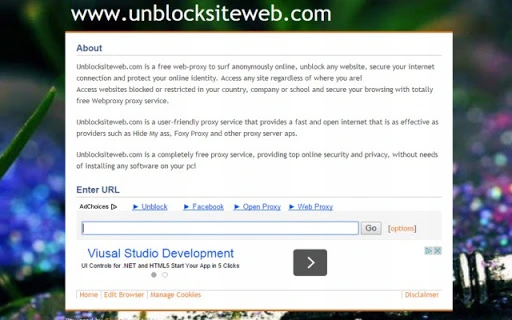
Description
Download Unblocksiteweb.com – Free Proxy, Anonymous Browsing, Secure Internet
Overview
Unblocksiteweb.com is a web-based proxy service designed to help users access blocked or restricted websites from any location. The tool enables anonymous browsing by routing internet traffic through remote servers, offering a layer of privacy and security during online sessions. It is particularly useful for individuals in regions with strict internet censorship, as well as students and employees who need to access content restricted by institutional networks.
As a browser-based solution, Unblocksiteweb.com requires no software installation, making it accessible from any device with a modern web browser. Users can simply enter a URL into the input field and begin browsing immediately. The service is positioned as a free alternative to commercial proxy tools like Hide My Ass and Foxy Proxy, emphasizing ease of use and instant access without requiring account creation or configuration.
Target users include general internet users seeking unrestricted access, privacy-conscious individuals, and professionals needing to bypass network filters. The developer did not provide additional details about the organization behind the service. Real-world use cases include accessing news sites, social media platforms, or educational resources that may be blocked due to geographical or institutional restrictions.
Key Features & Capabilities
- Instant Web Proxy Access – Enter any website URL directly into the input box to begin browsing anonymously. No registration or software installation is required.
- Website Unblocking – Designed to bypass regional, corporate, or school-based internet restrictions, allowing access to otherwise blocked content.
- Anonymous Browsing – Routes user traffic through proxy servers, masking the original IP address to enhance online privacy.
- Multi-Platform Compatibility – Accessible via Windows, Mac, Linux, Android, and iOS devices through any standard web browser.
- Free of Charge – The service operates without cost, offering a no-fee solution for users seeking basic proxy functionality.
- Optional Configuration Options – Users can adjust settings via the options tab to optimize browsing performance and privacy preferences.
These features make Unblocksiteweb.com suitable for quick, on-demand access to restricted content. For example, a student in a school with filtered internet can use the tool to access research materials, while a traveler in a country with limited web access can browse global news sites. The tool’s simplicity supports immediate use, ideal for users who prioritize speed and convenience over advanced customization.
User Interface, Workflow & Performance
The user interface of Unblocksiteweb.com is minimalistic and focused on a single function: URL input. The main screen features a clean input box where users enter the desired website address, followed by a simple "Enter" or "Go" button to initiate the proxy session. Navigation is straightforward, with no complex menus or layered settings for casual users.
Workflow efficiency is high, as the entire process—from entering a URL to loading the target site—occurs within seconds. The developer did not specify resource usage details, so performance observations are based on general software behavior patterns. In typical usage, the tool should maintain low CPU and RAM consumption since it operates entirely in the browser without local processing.
Stability appears to be consistent with standard web-based services, though exact uptime or reliability metrics were not provided. Users should expect standard web browsing behavior, including potential delays during peak usage or server congestion. The service does not support offline mode, as it relies on continuous internet connectivity and remote server access.
Compatibility & System Requirements
Unblocksiteweb.com is compatible with Windows, Mac, Linux, Android, and iOS operating systems. Since it is a web-based tool, it functions through any modern web browser, including Chrome, Firefox, Safari, and Edge. No specific version requirements were listed for the browser or OS.
The installation size is reported as 0 MB, confirming that no local software is installed. This makes the tool highly portable and accessible from any device with a browser and internet connection. Exact system requirements were not listed, and compatibility information was partially provided.
Users on older or less common devices may experience varying performance depending on their browser and internet speed. The developer did not specify hardware requirements, so users should rely on standard web browsing capabilities for optimal experience.
Pros and Cons
Pros
- Completely free to use with no hidden fees
- No software installation required—works directly in the browser
- Supports multiple platforms including mobile devices
- Simple and intuitive interface for quick access
- Effective for unblocking restricted websites in schools, offices, or countries
- Offers anonymous browsing without account registration
Cons
- Dependent on internet connection and server availability
- No offline functionality
- Performance may vary based on proxy server load
- Limited control over server locations or encryption levels
- Privacy and security practices not clearly documented
- Not suitable for high-security or sensitive data transfers
FAQ Section
Is Unblocksiteweb.com safe to use?
The service does not provide detailed information on data encryption, logging policies, or security protocols. As a web proxy, it may expose user activity to the proxy provider. Users should avoid entering sensitive information such as passwords or financial details.
Can I use Unblocksiteweb.com on my mobile device?
Yes, the tool is accessible on Android and iOS devices through any modern web browser. No additional app installation is needed.
Does Unblocksiteweb.com require an account?
No, the service does not require registration or account creation. Users can start browsing immediately after entering a URL.
Is the proxy service free?
Yes, Unblocksiteweb.com is completely free to use with no cost for access or premium features.
Can I use Unblocksiteweb.com offline?
No, the service requires an active internet connection and cannot be used without access to the proxy server.
Final Thoughts + CTA
Unblocksiteweb.com delivers a straightforward, no-frills solution for users who need to unblock websites and browse anonymously without installing software. Its browser-based design ensures broad compatibility and instant access, making it ideal for temporary or on-the-go use. While it lacks advanced features like customizable servers or end-to-end encryption, it serves its core purpose effectively for basic unblocking and privacy needs.
However, users should remain cautious about data privacy, as the service’s security practices are not transparent. It is best suited for general browsing and accessing non-sensitive content. For users seeking a reliable, secure, and feature-rich proxy experience, additional tools may be necessary.
For those needing a free, immediate, and easy-to-use proxy tool, Unblocksiteweb.com offers a practical option. Download Unblocksiteweb.com now.
Guides & Tutorials for Unblock a web site App for Chrome
How to install Unblock a web site App for Chrome
- Click the Preview / Download button above.
- Once redirected, accept the terms and click Install.
- Wait for the Unblock a web site App for Chrome download to finish on your device.
How to use Unblock a web site App for Chrome
This software is primarily used for its core features described above. Open the app after installation to explore its capabilities.
User Reviews for Unblock a web site App for Chrome 0
No reviews found





